How to make a whatsapp link (no need to save numbers)
How do I do the WhatsApp link to be a buyer / person who wants to contact us does not have to save our number into contact?
It can be said that the average smartphone owner in Malaysia uses the WhatsApp application to send messages to anyone but sometimes we feel a little silly because we need to save the WhatsApp message number before we can send them messages (if we start a message conversation).
Although telegram applications are said to be safer and have more attractive functionality, WhatsApp applications remain an option.
In fact, there are several ways that you can use and interest it, you don’t need to save someone’s number to send them to order!
Keep reading and we show you how easy it is to do it.
Interests for the Whatsapp link for online sellers
If you are an online seller, isn’t it easier if you can make a special WhatsApp link for your phone number?
For example, when you post the product ad that you want to sell on Facebook or Twitter, you can include a link that will allow other people or your potential customers to send messages directly to your WhatsApp.
When someone clicks on a link, their WhatsApp application will open automatically and can continue to send you messages.
They no longer have to save your phone number first to allow them to send you to order directly. Is it easy?
1. Rasmi Link from WhatsApp
For those who don’t know, WhatsApp itself actually provides the functionality of the WhatsApp link but this function is only limited to WhatsApp business users.
To get a link for your phone number, follow the following steps:
- Open your Whatsapp Business Application
- Click “Settings”
- Click “Business Settings”
- Click “Short Link”
- Copy the link and you can paste everywhere your post on social media
Also read: MyBSN: How to Register BSN Online for First Time User
2. Use the official Whatsapp method
Some can also use the official Whatsaapp method itself:
Change
For example, if the recipient number is 012-3334444 and the recipient uses the number from Malaysia, then:
= +60123334444 - +6 is a Malaysian code
For more information, visit the FAQ WhatsApp site.
3
If you don’t use the WhatsApp business application, you can use the facilities provided by Wasap.my Web.
Smoke.my only functions as a shortening link and uses it very easily. Follow the following steps:
- Yes
- Add the “/” bilah sign followed by the number “6” representing the country code number.
- Then add the telephone number. Tasting
Paste or just share a link in your post on social media and when someone clicks on a link, they will continue to send you messages through the WhatsApp application.
Interestingly you don’t need to register at the hook. Web and can use this function for free. But if you register for an account at Wasap.my, you can build your own special link such as “ecentral.wasap.my”
Bonus: Add a message
You can also enter a special message for people you like. For example, you are a food seller and advertise your products in several comboes, Combo B and so on.
To make it easier for customers, you can produce special links by just adding messages behind the link. Make sure there is no “space” between messages.
For example:
- /exchange
- /Kombob
Bonus: Create a short link
If the link is too long, you can use a free short link service including Bitly and Owly.
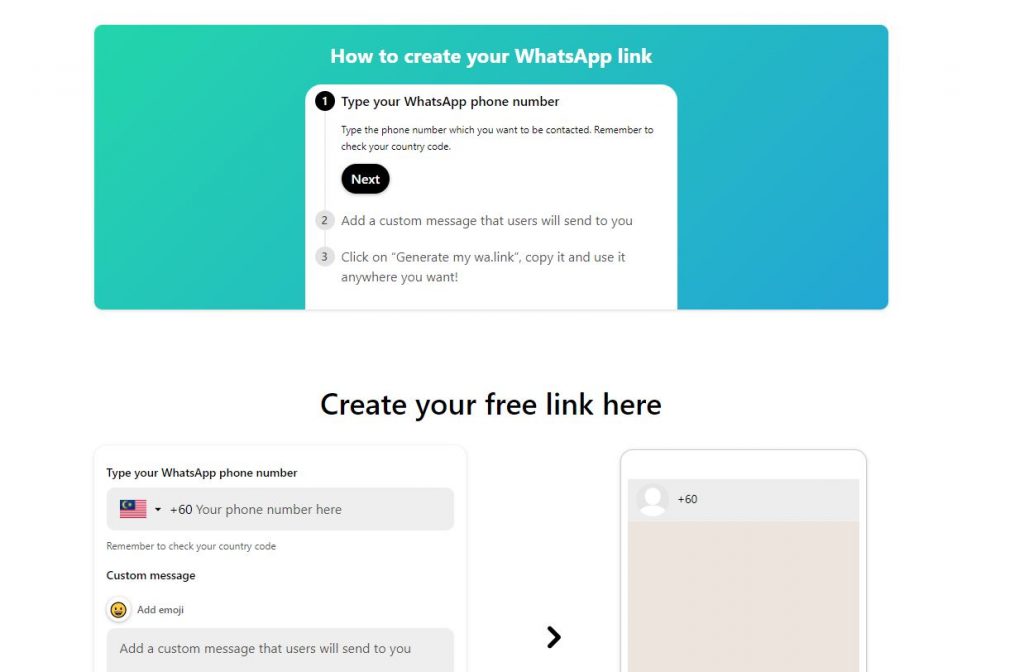
4. How to make a link using a wa.link site
You can also produce WhatsApp links without expressing telephone numbers for safety factors, scammers and more.
Easy, go to the site below to make a link:
Please refer to step by step guide through the video below:
Hopefully an article about how to make a whatsapp link is useful for you, especially for business owners or anyone
Game Center
Game News
Review Film
Berita Olahraga
Lowongan Kerja
Berita Terkini
Berita Terbaru
Berita Teknologi
Seputar Teknologi
Berita Politik
Resep Masakan
Pendidikan
Berita Terkini
Berita Terkini
Berita Terkini
review anime
Gaming Center
Originally posted 2025-07-06 23:25:51.